AI Review Response Generator
Let AI draft personal, context-aware replies to your customer reviews and respond to many reviews at once.
Respond to Google reviews with AI drafts
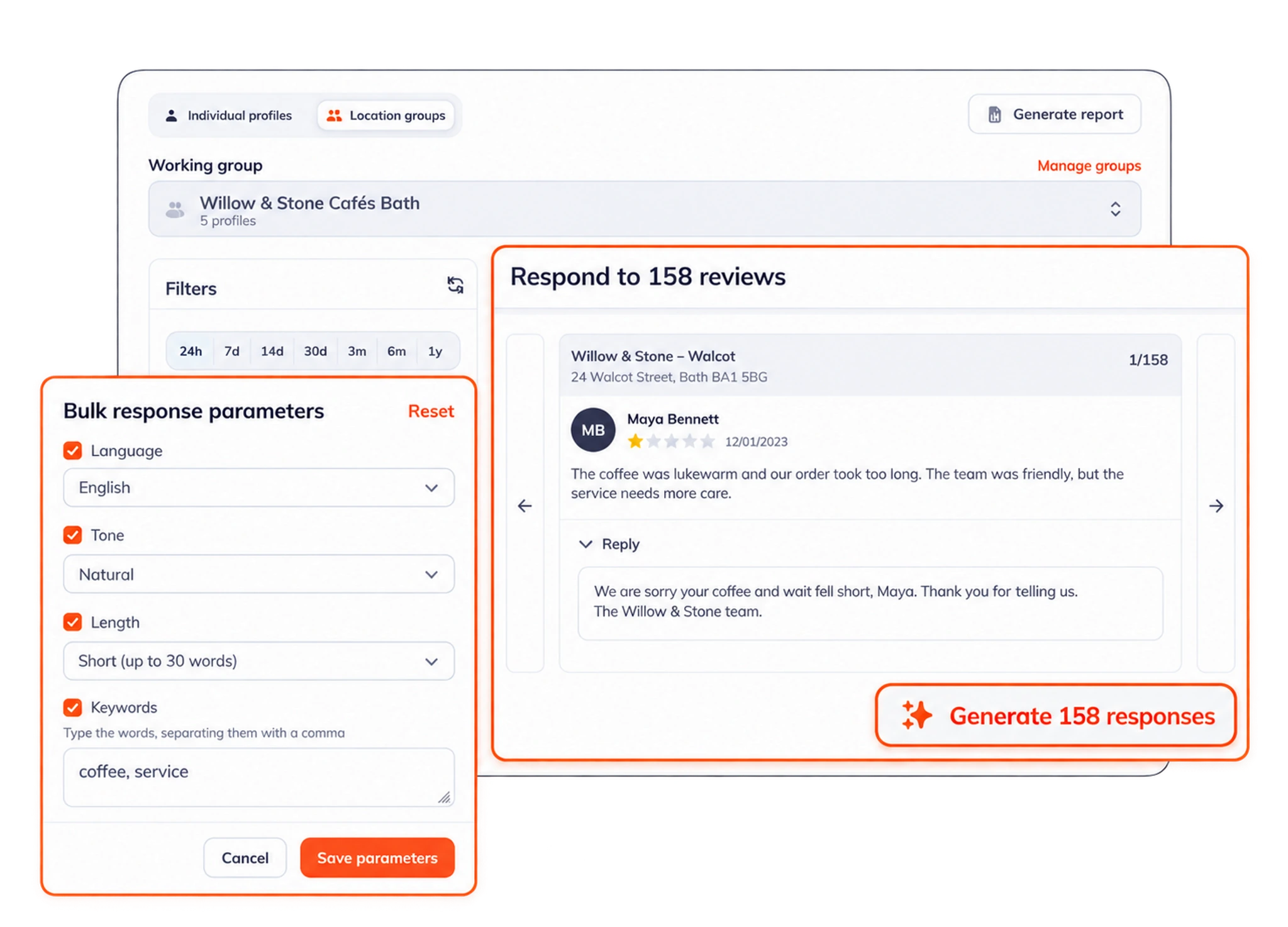
An AI review response generator reads a customer’s review and drafts a reply that fits what the customer wrote. Rating Captain Local uses AI to write personal, context-aware responses to your Google reviews and to customer questions, in a consistent voice for your business. That saves you from writing the same kind of reply over and over.
Response settings control the language, tone and length of the replies. Filters let you choose which reviews to answer, and the selected reviews are answered in one bulk run. You can also set replies to run automatically.
The generator also helps with negative reviews. It drafts a calm, empathetic reply that acknowledges the complaint, which makes difficult feedback easier to handle. For sensitive complaints or disputed facts, a person should read and adjust the draft before it is published.
Automatic replies
Set replies to customer reviews to run automatically.
Negative reviews
Helps you answer negative feedback calmly and reduce its impact.
Consistent tone
Replies keep a consistent, empathetic tone across all your reviews.
Context-aware
Replies to reviews and questions respond to what each customer wrote.
Frequently asked questions
What is an AI review response generator?
An AI review response generator reads a customer’s review and drafts a relevant reply. It helps a business respond to Google reviews consistently and cuts down on repetitive writing.
Can I control the tone of AI review replies?
Yes. Response settings let you choose the language, tone and length of the replies. You can also filter which reviews the generator answers.
Can AI respond to negative Google reviews?
Yes. It can draft a calm, empathetic reply that acknowledges the feedback. Sensitive complaints and disputed facts should get a human review before a reply is published.
Can AI reply to reviews automatically?
Yes. You can set AI replies to run automatically and choose which star ratings get an automatic reply.
How do I respond to Google reviews?
Open your Google Business Profile while signed in to the account that manages it, go to Reviews and choose Reply. Thank the customer, mention something specific from their review and keep it short. Replies are public, so future customers read them too. Rating Captain Local drafts these replies with AI and lets you answer many reviews at once.
How should you respond to negative reviews?
Reply soon and stay calm. Thank the customer, acknowledge the problem without arguing and offer a way to continue the conversation privately, such as a phone number or email address. Keep personal details out of the public reply. The AI responder can draft a calm first version, and a sensitive complaint deserves a human read before you post.
Have another question? Talk to our team.