
Bulk Profile Editing
Select several Google Business Profiles, edit opening hours and business details once, and send the change to every selected listing.
Change business hours on Google in bulk
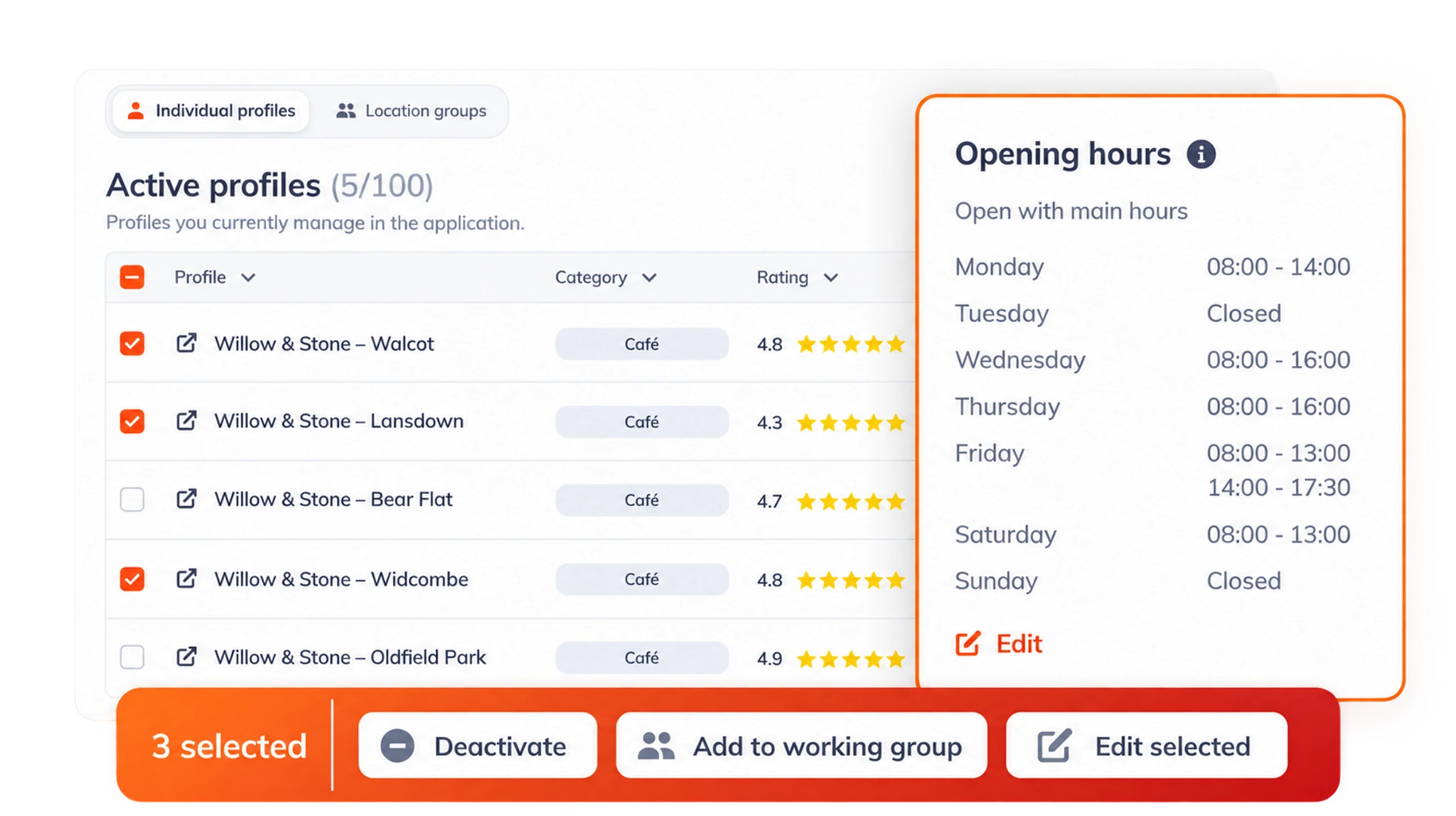
Bulk editing lets you update several Google Business Profiles at the same time. In Rating Captain Local you tick the profiles you want, choose Edit selected and change details such as opening hours. The update is then sent to Google for every selected listing.
It is most useful before public holidays and seasonal changes, when every branch needs the same special hours, and after company-wide changes such as a new phone number or website. Making the change once reduces the chance that one listing is forgotten or typed differently.
From the same list you can deactivate locations you no longer manage, or add the selected profiles to a location group so they are tracked and reported on together. Consistent details across every listing are a basic part of multi-location SEO, and bulk editing makes that consistency far easier to keep.
Edit once
Select several listings and change them together.
Opening hours
Set holiday and seasonal hours for every branch at once.
Consistent details
Keep names, numbers and hours the same everywhere.
Into groups
Add the selected profiles to a location group.
Frequently asked questions
What is bulk editing for Google Business Profiles?
Bulk editing means changing several Google Business Profiles in one action. You select the listings, make the change once, and it is sent to Google for each selected profile.
What can I change in bulk?
Opening hours, including special holiday hours, and other business details. From the same list you can also deactivate locations or add them to a location group.
Who needs bulk editing?
Anyone who has to manage multiple Google Business Profiles, such as chains, franchises and multi-site practices, or people who look after listings for several businesses.
Do bulk changes appear on Google immediately?
Changes are sent to Google straight away, but Google can review some edits before they appear publicly, so allow a little time before checking every listing.
How do I change my business hours on Google?
For one listing, sign in to your Google Business Profile, choose Edit profile, open Hours and save the new times. Use special hours for holidays. For many locations, select the profiles in Rating Captain Local, choose Edit selected and set the hours once. Google can review some edits before they appear.
Have another question? Talk to our team.